
That's the reality at most convenience stores. There's no HR department. There's a store manager handling ordering, staffing, cleaning, customer complaints, and closing paperwork, and somewhere in that list is payroll. The software they're using either makes that easier or it doesn't.
Most of it doesn't.
What's Actually Complicated About Convenience Store Payroll
On paper it looks simple: pay hourly workers, track their time, file taxes. In practice, you're dealing with overnight shift differentials that have to be calculated correctly every cycle, a constant churn of new hires that need to get into the system fast, part-time employees whose hours need to be monitored for ACA eligibility, and if you're running more than one store, labor cost visibility that falls apart the moment data lives in separate places.
Retail and convenience businesses see around 59.8 percent total annual turnover. That's not a number you manage with a legacy system and a shared spreadsheet. It requires onboarding and rehire workflows that actually work fast.
The 5 Best Payroll Software Platforms for Convenience Stores
1. Netchex: Best Overall for Convenience Store Operators
What Netchex gets right for convenience store operators is the combination of simplicity and completeness. Hiring, onboarding, time tracking, payroll, benefits, and compliance all live under one login. There's no bouncing between systems, no exporting data from one tool and importing it into another, no Friday afternoon where someone is trying to reconcile the time tracking software against the payroll platform before close.
Overnight and weekend shift differentials process automatically inside the payroll run. No manual rate adjustments, no separate calculation step. New hires receive a text or email, complete everything from their phone before their first shift, and are in payroll before they've worked an hour. Returning staff, and at 60 percent turnover, there are returning staff, reactivate in minutes because their records carry forward rather than starting over. Geofenced mobile clock-in ties every punch to the specific store location, which eliminates shared terminals and the timesheet disputes that come with them.
For operators running multiple stores, the centralized dashboard shows labor costs, overtime status, and ACA compliance by site in real time. Part-time hours are tracked automatically against ACA eligibility thresholds so you're not discovering compliance exposure when it's already too late to fix it. Earned Wage Access gives hourly employees a way to access wages between pay cycles, which research consistently links to lower voluntary turnover. And when something doesn't look right on a payroll run, support answers in under a minute from someone in the U.S. who actually knows the system.
One verified G2 reviewer noted: "Netchex is easy to use and covers everything we need in one place. The support team is incredibly responsive and actually knows our account."
2. ADP RUN: Good for Very Small Single-Location Stores
ADP RUN is the small-business entry point in ADP's product family, and for a single-location store with a small stable team and no complex pay structures, it covers the basics reliably enough. Setup is quick and the price point is accessible. Overnight differential calculations require manual entry rather than automated handling, multi-location management isn't what this product was built for, and support runs through a general queue rather than anyone with retail or convenience store knowledge.
Good for: Single-location stores with fewer than 10 employees and straightforward hourly-only pay.
3. Paycor: Good for Growing Convenience Store Groups
Paycor is cleaner and more modern than most mid-market payroll platforms, and it scales from single to multi-location without requiring a technical background. Store managers can navigate it without HR training. Shift differentials need to be configured during setup rather than working natively, and there are no convenience store-specific integrations. For a group that's adding locations and needs reliable multi-site payroll without enterprise-level complexity, it's a reasonable choice.
Good for: Growing convenience store groups adding locations who need reliable multi-site payroll with a manageable learning curve.
4. Paylocity: Good for Engagement and Retention Focus
Paylocity took a different direction from most payroll platforms and leaned into engagement: peer recognition, pulse surveys, community communication tools. For a convenience store operator dealing with persistent voluntary turnover, those features can genuinely move retention numbers when the underlying pay and scheduling are already solid. Core payroll is reliable. There's no convenience store vertical focus and no deskless workforce-specific depth, so it addresses the culture side of the problem more than the operational side.
Good for: Operators who've sorted out payroll basics and want to tackle voluntary turnover through better employee experience.
5. UKG Pro: Best for Larger Convenience Store Chains
UKG's scheduling and time management tools are among the strongest available for chains managing complex shift patterns across many locations. Auto-scheduling, real-time attendance visibility, and detailed labor analytics are genuinely valuable at that scale. For a single-location store or a small group, the implementation scope and ongoing platform weight are more than the operation needs or wants to manage.
Good for: Regional or national convenience store chains with complex multi-location scheduling and a dedicated HR team.
Quick Comparison Table
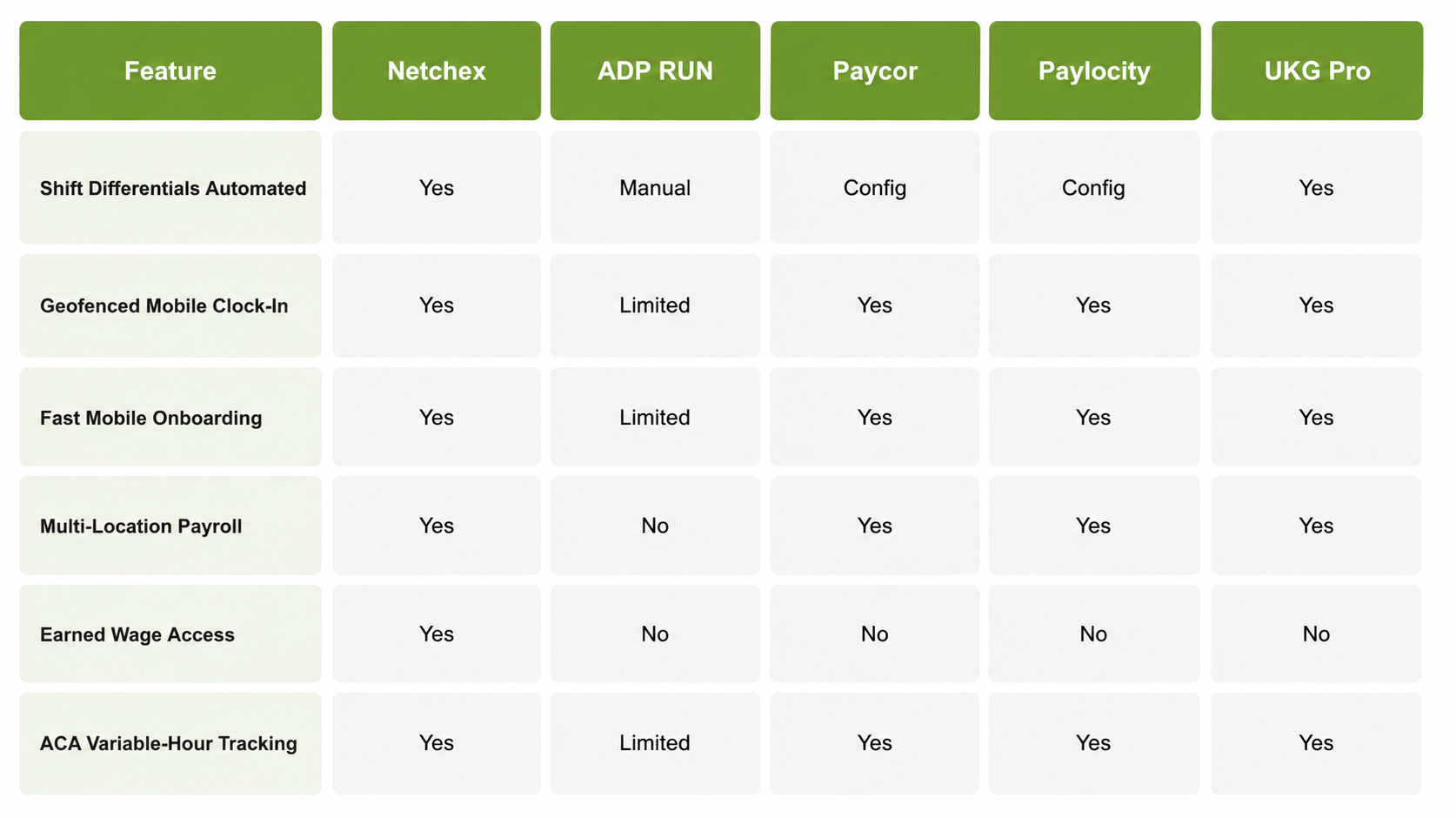
Payroll Should Be the Least of a Store Manager's Problems
A system that requires manual differential calculations, can't onboard someone fast, or sends you to a call center when something breaks at 5pm is the wrong tool for how convenience stores actually run. Netchex handles the whole thing in one place. Request a demo at netchex.com.
Frequently Asked Questions
1. Do overnight shift differentials actually calculate automatically or is that still manual?
In Netchex, overnight and weekend differentials are automated inside the payroll engine. Once the rules are set up, they apply every cycle without anyone re-entering rates or checking calculations. In platforms where this isn't native, someone is doing that math by hand or in a spreadsheet before entering the result, which is where errors tend to happen.
2. My staff doesn't sit at a desk. How do they clock in?
Netchex's geofenced mobile clock-in lets employees punch in from their smartphones, with each punch verified to the store's physical location. No shared terminal required, no paper timesheet, and no trying to piece together who was actually at which store when.
3. How does managing payroll across multiple store locations actually work?
All locations run through a single Netchex dashboard. You can see labor costs, overtime exposure, and compliance status by store in real time, and process payroll for all locations in one run. Operators running multiple stores typically find this is one of the bigger time savings compared to logging into separate systems per site.
4. How fast does a new hire actually get set up, like from offer to first shift?
If the hire happens in the morning, a new employee can complete onboarding from their phone and be in the payroll system before their afternoon shift. For rehires, which at 60 percent annual turnover is a significant portion of new hires, prior records carry forward so the process is even shorter.
5. What does ACA compliance actually look like for part-time convenience store staff?
Netchex tracks hours worked against ACA eligibility thresholds automatically for every variable-hour employee. When someone is trending toward the threshold, you get a flag before they cross it, not after they've already triggered a compliance requirement you didn't see coming.